Install your app
Why you install
The API never hands your app a master key. What a token can see depends on who it acts as, and there are three cases. This page is about the third.
- Your app, with no person. A client-credentials
token holds
read:publiconly: the public deal catalog. No install is involved. - A user who authorized your app. A user token acts as that person and sees what they can
see, across everything they have access to at once: their own investments, plus the investments
into every company they edit. If a founder authorizes your app,
GET /investmentsalready returns their company's investments; no company install is needed for that. The consent records a user install, the app shows under the user's Settings → Connected apps, and the token lives two hours with a refresh token. Your first request shows the call. - A company or syndicate itself. An install is your app, one target, and the permissions someone who controls that target granted. Tokens minted from it are owned by the company or syndicate, read exactly that target with exactly the install's scopes, never expire, and survive the installer leaving. Revoking the install kills every token minted from it.
Install when the integration belongs to the business rather than to one person's login: a CRM sync that must keep running after the founder who set it up changes roles, or a tool a whole syndicate team relies on. If you only need to act as a user while they are around, the Authorization Code flow is enough. The Security Model lists every credential kind side by side.
This page uses your live key, on companies and syndicates you can really edit. The same flow
works in your sandbox realm with your test key, on the realm's seeded company and logins, and
yields at_test_ tokens; only the portal's You row is live only. See
Installing in your realm.
Pick your path
| You want to… | Who clicks | Where |
|---|---|---|
| Try the API as yourself | You | Portal: the You row, Mint token |
| Read your own company or syndicate | You | Portal: Install next to it, then Mint token |
| Read someone else's company or syndicate | The founder, or anyone who edits it | Portal: Send someone the install link. You mint the token afterwards |
| Install on many client companies from code | Your server, with a staff member's user token | From the API below |
Before any of these: create the application in the developer portal with the scopes it needs. Declared scopes are the most an install can carry. You can add one later only while the app has not been through review, and an existing install never gains it without a re-install; see Changing scopes before you decide to leave one out.
From the developer portal
Pick your app in the left sidebar and open Installations. Everything below is on that one page.
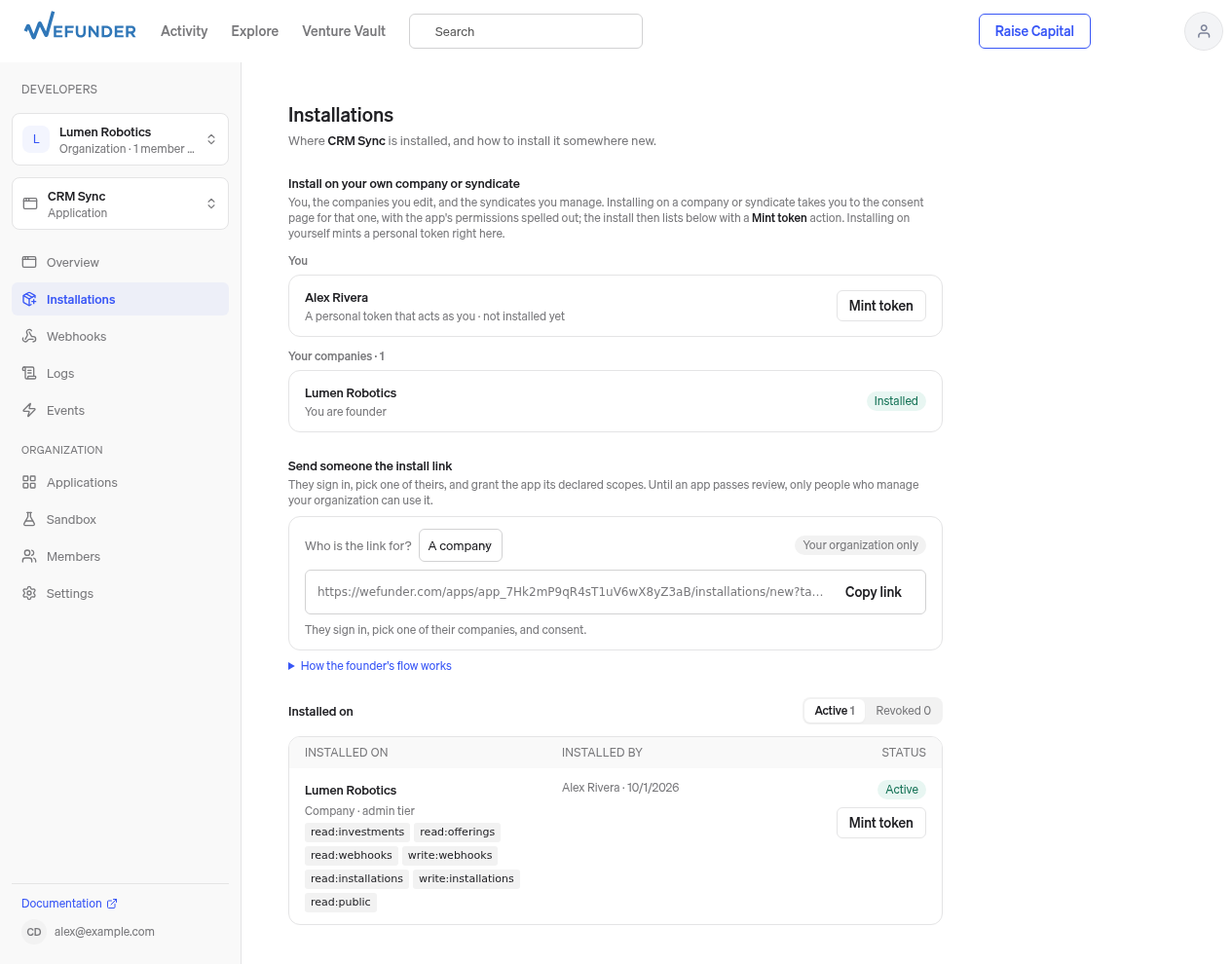
Developer portal → your app → Installations. Top: install on yourself or a company you edit (this one is already installed). Middle: the link to send a founder. Bottom: every install so far, each with Mint token.
Yourself: a personal token
Under Install on your own company or syndicate, the first row is You. Press Mint token. You get a token that acts as you, with the app's declared scopes, shown once. Good for trying user endpoints before you wire up OAuth. Revoke it any time from Settings → Connected apps.
curl https://api.wefunder.com/users/me -H "Authorization: Bearer at_live_…"
Your own company or syndicate
- In the same section, your companies and syndicates are listed. Press Install next to one.
- You land on a consent page for exactly that target. It lists what the app will be able to do, what it never can (invest, reserve, or sign), and the tier you are granting. Confirm.
- Back on Installations, the new install appears under Installed on. Press Mint token.
The token is owned by the company or syndicate, not by you. It reads exactly that target with exactly the install's scopes, does not expire, and stops working when the install is revoked. It is shown once. Lose it and mint another; earlier tokens stay valid.
The first call depends on which kind of target owns the token. A company token works on the company
endpoints; a syndicate token works only on the /syndicates endpoints, and any other path answers
403 with "Organization tokens can only access syndicate endpoints".
Company token (install needs read:investments): the company's investments, under data.
curl https://api.wefunder.com/investments -H "Authorization: Bearer at_live_…"
Syndicate token (install needs read:syndicates): first list syndicates. The token sees exactly
the one it was minted for, so data[0].id is the syn_… id to use on every later call. The same id
is target.id on the install in GET /installations.
curl https://api.wefunder.com/syndicates -H "Authorization: Bearer at_live_…"
curl https://api.wefunder.com/syndicates/syn_aB3xQ9k2vF8mNp1zT5wY7Qc4/deals -H "Authorization: Bearer at_live_…"
The second call returns the syndicate's live deals under data; an empty
data array is still a success when nothing is raising. The Mint token panel shows the right
first call for the install it just minted.
Someone else's company or syndicate
- Under Send someone the install link, choose A company or A syndicate and Copy link.
- Send it to the founder or syndicate lead. They sign in, pick one of theirs, and consent.
Append
&state=<your id>to the link if you need to tell installs apart. - The install appears under Installed on. Press Mint token, or mint from your server with
POST /installations/{id}/tokens.
Until your app passes review, only people who manage your developer organization can use the link. Submit for review from the app's page; after approval any editor of a company can install it. Choosing A person instead gives you the app's OAuth authorize URL, for connecting an individual user rather than a company.
What an install carries
- Scopes: the app's declared scopes, intersected with what the installer may grant. A scope the app does not hold is dropped, not rejected, so read the install's scopes rather than assuming.
- Tier: the installer's own tier or lower. An editor grants editor tier, which is read-only.
- Write scopes need a company editor. A founder or admin without edit access installs read-only.
- Investor PII (
read:investors:pii) is granted per install, and only when the installer manages your organization or Wefunder has approved the app for it. See Installations for the full rules.
What an install lets you do on offerings
An install token can create invite links and hosted investment
sessions on the installed syndicate's or company's offerings, whether they were created on
wefunder.com or through the API: POST /offerings/{id}/invite_links and
POST /offerings/{id}/investment_sessions, with write:invite_links or
write:investment_sessions in the install. An offering outside the install returns 404.
A hosted investment session belongs to the app that created it, like a checkout session in a payments API. Listing, reading and canceling return only sessions your app created: never one made by another app (even one of your organization), and from a syndicate's or company's install token, only that syndicate's or company's. Invite links belong to the syndicate or company, so you can see links made on wefunder.com too.
From the API
For an integration that installs itself on each client company, or mints tokens from a server.
1. A user token that may install. Send a staff member who edits the client company through the
Authorization Code flow requesting
read:installations write:installations plus what the app reads. Both install scopes are needed.
2. See where that user can install.
curl "https://api.wefunder.com/installations/eligible?target_type=company" \
  -H "Authorization: Bearer $USER_TOKEN"
3. Install, and keep the token. The response carries the install under data and the
company-owned token under token, shown once.
curl -X POST https://api.wefunder.com/installations \
  -H "Authorization: Bearer $USER_TOKEN" -H "Content-Type: application/json" \
  -d '{"target_type":"company","target_id":"co_aB3xQ9k2","scopes":["read:investments"]}'
4. Mint a token for an install someone else made (a founder who used your link):
curl https://api.wefunder.com/installations -H "Authorization: Bearer $USER_TOKEN"
curl -X POST https://api.wefunder.com/installations/inst_7Hk2…/tokens -H "Authorization: Bearer $USER_TOKEN"
The user token must belong to someone who manages your app's organization or could revoke the
install. The credential is token.access_token.
Check that it worked
- Installations → Installed on lists the install with its tier, scopes, and who installed it.
GET /installationswith your user token returns the same list.- Logs shows the calls the new token makes. A token whose install was revoked gets
401.
Revoking
DELETE /installations/{id} from your side, or Settings → Installed apps on the founder's.
Every token minted for that install stops working immediately.
Next
- Sync Investments to Your CRM uses one install per company end to end.
- Installations: tiers, scope intersection, investor PII, revocation.
- Webhooks for the companies you are installed on.