Sync Investments to Your CRM
Keep a company's Wefunder investments current in your CRM, spreadsheet, or email tool without anyone exporting a CSV. For founders syncing their own company, and for firms that help many founders raise, like marketing partners and agencies.
How it works. You install your app on a company once. The install gives you a token that reads that company and nothing else. You list the company's investments once, keep the cursor the last page returns, and from then on pull only what changed. A webhook tells you when to pull. Four steps, about thirty minutes to the first synced investment.
your app ──install on a company──▶ company token + cursor ──▶ GET /investments (list, then sync)
                                                 ▲
                      investment.changed webhook ┘  "something changed on co_…; sync it"
Before you start
What the sync gives you, so the first run is not a surprise:
- Current state, not history. The first pull returns each investment as it is now, one record per investment. Webhooks are not replayed for events before your endpoint existed.
- Open and recently closed rounds only. An investment is tracked while its round is open or closed within the last 90 days; a testing-the-waters reservation while its page is open or a linked live round is inside that window. Rounds that had aged out before the feed existed never enter it. For those, import the founder dashboard's Investor CSV once and keep the rows; Mapping into your CRM shows how the sync leaves them alone.
- Investments, not contacts. Each record is one investment (
inv_…). The person isinvestor.id(usr_…), the same id across every investment they make with any company, so one investor can hold several records. Your CRM contact is the investor; the deal or row is the investment. - Your own company, or a client's. Installing on a company you edit needs no review. Installing on companies outside your developer organization needs app review first, and investor-PII review separately if those installs should carry names and emails. Step 1 covers both.
- Names and emails are a scope. Without
read:investors:piia record carriesinvestor.idbut no name, email, or address. PII says who may grant it, and names the one case (testing the waters without full service) whereemailis withheld even with the scope. - Totals.
amounts.raised_centsis this investment's share of its offering's public raised total. Summing it over one offering's records reproduces that offering's figure, andGET /offerings/{id}/statsreturns the same totals pre-aggregated. The ticker on a deal page is campaign-level and can include sibling Reg D offerings, so a correct single-offering sum can be lower than the page without anything missing.committed_centsis what the investor committed; it andraised_centslegitimately disagree on recent, unpaid investments.
Step 1: Create the app
In the developer portal, open Create application and pick Sync a company's investments at the top of the form. That preset fills in everything this guide needs, and the form shows exactly what it will request before you press Create:
read:investments read:companies read:installations write:installations read:webhooks write:webhooks
| Scope | Why |
|---|---|
read:investments | Read investment records; receive investment.changed |
read:companies | Read the company and its rounds; also what the lifecycle investment.* events are gated on |
read:installations, write:installations | Install on a company and mint its token |
read:webhooks, write:webhooks | Create and manage your webhook endpoint |
The preset asks two things the scopes alone do not settle:
- Whose investments will it sync? Your own company, or companies you work with. The answer changes nothing in the app; it tells you which reviews to plan for. Your own installs need no review of any kind. Installs by founders outside your developer organization need app review first (so their install link works), and investor-PII review separately if their installs should carry names and emails. Both are requested from the app's page after it exists, and neither blocks creating the app or installing on your own company.
- Include investor names and emails? Ticking it adds
read:investors:pii. Your own install on a company you edit carries it with no review; see PII before you install anything for a client.
Two things the preset decides for you, so you do not have to:
- Client type: confidential. A server-side key with a secret. This route mints tokens from the portal, which a public (PKCE) key cannot do.
- Redirect URI: none. Nobody is sent through OAuth on this route. Installs happen on the app's Installations page or through its install link, and tokens are minted there, so there is no callback server to run and no URL to invent. These keys can't use the authorization-code flow until you add a redirect URI from the app page.
Installs and minted tokens always use the live key, so you test this route on live against
your own company; the sandbox mints no company-owned tokens, so this route cannot complete there
(the full line is in What works in sandbox).
The test key of a callback-less app can only mint a read:public token through client
credentials; it cannot reach investments.
The name and redirect URI of an app cannot be changed after it is created, and scopes can only be added (never removed) while the app has not been through third-party review. A scope added later reaches a company only through a re-install there, with new tokens; see Changing scopes.
Anyone who edits a company or manages a syndicate on Wefunder can enter the portal. Creating
the app gives you a live client (pk_live_ / sk_live_). The secret is shown once, and the
screen that shows it offers Go to Installations, which is Step 2.
Step 2: Install on a company
An install is how a company says yes to your app; the token in Step 3 comes from it. Installing needs someone who can edit the company. In the developer portal, pick your app and open Installations.
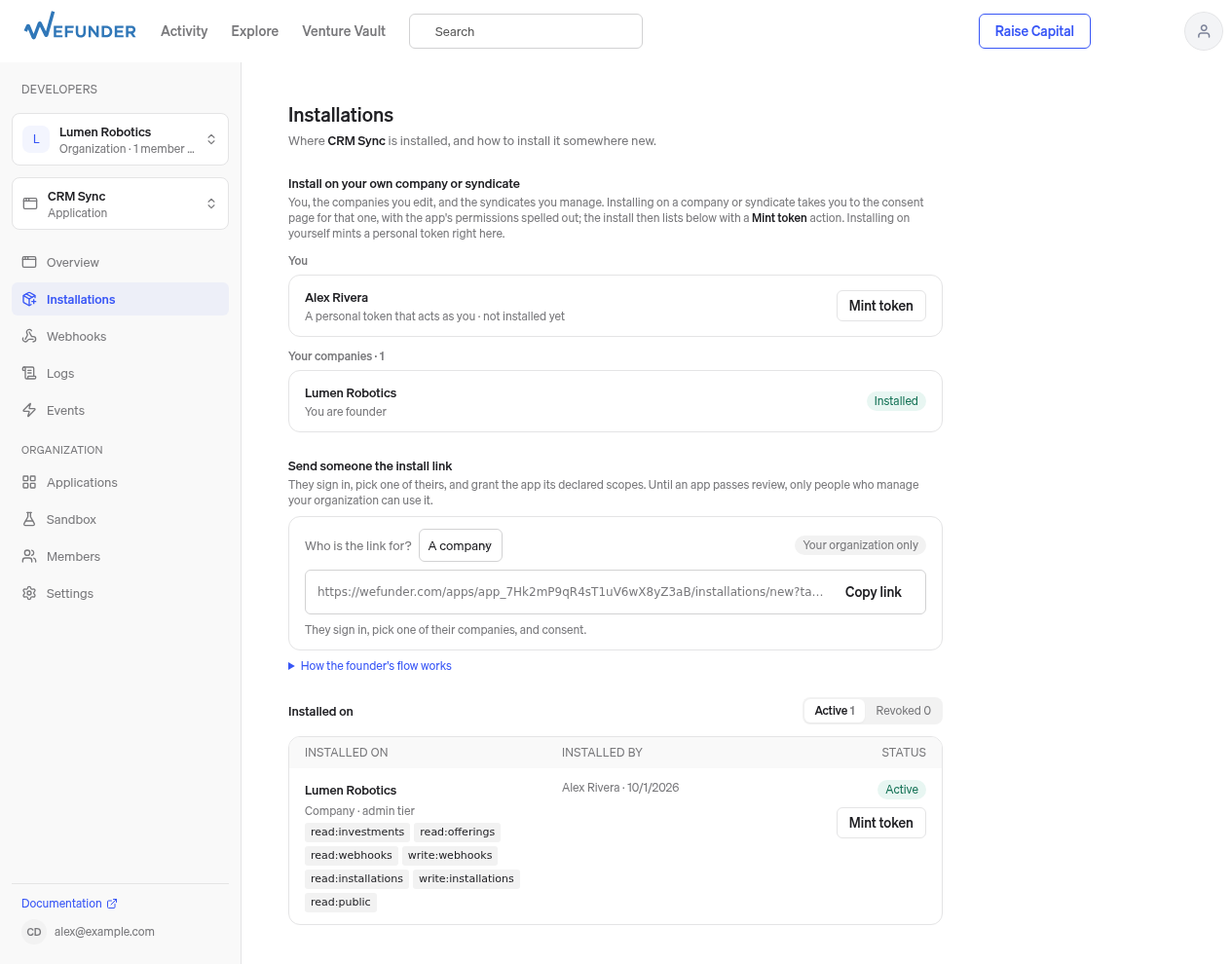
Developer portal → your app → Installations. Your own company is listed at the top with an Install button (it reads Installed once done); the link for a founder is in the middle; installs and their Mint token buttons are at the bottom.
- Your own company: under Install on your own company or syndicate, press Install next to it and confirm on the consent page.
- A client's company: under Send someone the install link, choose A company, Copy link, and send it to the founder (or anyone on their team with edit access). They sign in, pick their company, and consent. If you are already an editor on their team, open the link yourself. Until your app is approved, only people in your developer organization can use the link; submit for review from the app's page so any editor can.
Either way the install appears under Installed on. It carries your app's scopes intersected with what the installer's role can grant; read the scopes shown there rather than assuming. Repeat this step for every company; nothing else in the guide changes per company. The full rules are in Install your app.
Step 3: Get the company token
The token that reads a company is minted from its installation and is owned by the company, not by you. The quick way: on the install's row under Installed on, press Mint token. It is shown once; copy it.
From a server instead, mint a personal token first: on the same Installations page, the first
row under Install on your own company or syndicate is You; press Mint token. It acts
as you with the app's declared scopes, which include
read:installations write:installations read:webhooks write:webhooks. (This app has no
redirect URI, so Authorization Code is not an option for it; the personal token replaces that
step.) Then:
# Find the install (one entry per company you have installed on)
curl -H "Authorization: Bearer $USER_TOKEN" https://api.wefunder.com/installations
# -> { "data": [ { "id": "inst_7Hk2...", "type": "installation",
#                  "attributes": { "target": { "type": "company", "id": "co_aB3xQ9k2", "name": "..." },
#                                  "tier": "editor", "scopes": ["read:investments", "read:companies", ...], "status": "active" } } ] }

# Mint the company token
curl -X POST -H "Authorization: Bearer $USER_TOKEN" https://api.wefunder.com/installations/inst_7Hk2.../tokens
# -> 201 { "data": { ...the installation... }, "token": { "access_token": "at_live_...", ... } }
Store the access_token per company as COMPANY_TOKEN, alongside the cursor you will get in
Step 4. It does not expire; it stops working the moment the install is revoked.
The company ID the Step 4 samples pass as company_id is attributes.target.id on the
install (co_aB3xQ9k2 above). The portal's Installations page shows the company's name, not its
id, so copy it from this response, or from the company field of any record the token returns.
A company token already reads only its company, so company_id narrows nothing there; the samples
keep it so each request says which company it is for.
Step 4: Backfill, then stay current
Backfill once. List the company's investments, follow next_cursor while has_more, and
save the last page's next_cursor. That cursor is positioned at the moment the listing
started, so anything that changed while you were paging arrives on your first sync.
Then sync on every nudge. Pass the saved cursor and you get only the records that changed, one per investment, already collapsed to current state. Upsert them and save the new cursor, even when the page is empty. Run it when a webhook arrives and on a 30-minute timer as a safety net, and run one sync per company at a time.
The snippets below show the integration contract and leave store, withLock, upsert, and
replace to you. investment-sync-nextjs
in the wefunder-examples repository is a runnable Next.js app that supplies them: finding and
installing on companies, a token and cursor store per company, this sync loop with tombstone,
deactivated-investor, and 410 handling, the signed webhook receiver, and a Slack money feed.
Setup is in its README:
copy .env.example to .env.local with the values from your app's portal page, then
npm install and npm run dev; npm test runs its tests without touching the API.
Before you run it:
- It is a reference example, not a production integration. Its README lists what it simplifies: state is one JSON blob where production keeps a row per company; its per-company lock spans instances only on Upstash or Redis (the local JSON-file fallback covers one process); and the dashboard sits behind HTTP basic auth with one shared password.
- Its app needs a redirect URI. The example connects a staff user through Authorization Code
with PKCE, so the callback-less preset from Step 1 cannot run it. Create its app through
Something else with
http://localhost:3000/api/wefunder/oauth/callbackas the redirect URI and the Step 1 scopes plusread:profile: the staff-user flow asks forread:installations write:installations read:profile(lib/env.ts), and an OAuth request may only name scopes the app was registered with, so a registration withoutread:profilefails withinvalid_scopebefore any code is issued. The.env.examplelists every variable. - The repository is private during the beta. If the links above show a sign-in page or a 404, email [email protected] with your GitHub username to request access.
The SDK tabs need the client installed: npm install @wefunder/sdk, pip install wefunder, or
gem install wefunder (SDKs). The cURL tab needs only the token.
One checkpoint per run. The samples advance cursor on every page but persist it once, after
the last page, so a crash mid-run replays the whole run from the previously saved cursor. That
replay is safe: every record is upserted on its id and a tombstone deletes by id, so a page
applied twice changes nothing. What is never safe is a cursor saved ahead of the records it
covers; those records are skipped for good. If you checkpoint per page instead, write that page's
records and its next_cursor in one transaction. The go-live checklist
states the same rule.
"data": []with"mode": "bootstrap": the company has no tracked investments (see Before you start), orcompany_idnames a company this token does not read, which returns only what the token can see there, usually nothing, rather than an error. Checkattributes.targeton the install, and compare the count you expect with the founder dashboard's Investors tab.- Records with
investor.idbut noinvestor.emailorinvestor.name: the install's grantedattributes.scopeslackread:investors:pii, whatever the app declares. PII says how to fix the install. 401: read the error message before doing anything; both cases aretype: "unauthorized"."The installation this token was issued for has been revoked"means the install itself is gone: a founder removed the app, so install again (Step 2) and mint a new token. Anything else ("Invalid or expired token") is the credential, not the install: a missing or mistyped bearer, or a token revoked on its own. Confirm withGET /installations/{id}that the install is stillactive, then mint a new token for it (Step 3). Do not reinstall over an active install; that is a409 already_installed.
- cURL
- JavaScript
- Python
- Ruby
# Backfill
curl -H "Authorization: Bearer $COMPANY_TOKEN" \
  "https://api.wefunder.com/investments?company_id=co_aB3xQ9k2&per_page=100"
# -> { "data": [ { "id": "inv_8f3kQ2", "visible": true, "status": "active", "group": "CONFIRMED", ... } ],
#      "meta": { "mode": "bootstrap", "has_more": true, "next_cursor": "eyJ2Ijox...", ... } }
# Repeat with &cursor=<next_cursor> while has_more. Save the LAST page's next_cursor.

# Sync (on each webhook, and on a timer). Keep company_id: the cursor does not carry filters.
curl -H "Authorization: Bearer $COMPANY_TOKEN" \
  "https://api.wefunder.com/investments?company_id=co_aB3xQ9k2&cursor=$SAVED_CURSOR"
# -> { "data": [ ...only changed records, tombstones included... ],
#      "meta": { "mode": "delta", "has_more": false, "next_cursor": "eyJ2Ijox...", ... } }
# Save next_cursor even when data is empty.
import { Wefunder } from "@wefunder/sdk";

// Backfill and sync are the same loop: no cursor lists, a saved cursor syncs.
async function sync(companyId) {
  await withLock(companyId, async () => {
    const { token, cursor: saved } = await store.company(companyId);
    const wf = new Wefunder({ accessToken: token });
    let cursor = saved;
    try {
      do {
        const page = await wf.investments.list({ company_id: companyId, cursor, per_page: 100 });
        for (const record of page.data ?? []) await upsert(companyId, record);
        cursor = page.meta.next_cursor;              // every page, including the last
        if (!page.meta.has_more) break;
      } while (cursor);
      await store.saveCursor(companyId, cursor);     // even when nothing changed
    } catch (err) {
      if (err.status === 410) return replace(companyId);   // cursor older than ~90 days: list again, replace API-managed rows only
      throw err;
    }
  });
}
from wefunder import Wefunder, WefunderError

# Backfill and sync are the same loop: no cursor lists, a saved cursor syncs.
def sync(company_id):
    with company_lock(company_id):
        company = store.company(company_id)
        wf = Wefunder(access_token=company["token"])
        cursor = company["cursor"]
        try:
            while True:
                page = wf.investments.list(company_id=company_id, cursor=cursor, per_page=100)
                for record in page.data:
                    upsert(company_id, record)
                cursor = page.meta.next_cursor          # every page, including the last
                if not page.meta.has_more:
                    break
            store.save_cursor(company_id, cursor)       # even when nothing changed
        except WefunderError as err:
            if err.status == 410:
                return replace(company_id)              # cursor older than ~90 days: list again, replace API-managed rows only
            raise
require "wefunder"

# Backfill and sync are the same loop: no cursor lists, a saved cursor syncs.
def sync(company_id)
  with_lock(company_id) do
    company = store.company(company_id)
    wf = Wefunder::Client.new(access_token: company[:token])
    cursor = company[:cursor]
    begin
      loop do
        page = wf.investments.list(company_id: company_id, cursor: cursor, per_page: 100)
        page.data.each { |record| upsert(company_id, record) }
        cursor = page.meta.next_cursor                   # every page, including the last
        break unless page.meta.has_more
      end
      store.save_cursor(company_id, cursor)              # even when nothing changed
    rescue Wefunder::Error => e
      raise unless e.status == 410
      replace(company_id)                                # cursor older than ~90 days: list again, replace API-managed rows only
    end
  end
end
Three records need special handling when you upsert:
- A record with
"visible": falseand nostatusis a tombstone: the investment is no longer visible to the company. It carries onlyid,visible,observed_at,cursorandreason. Delete your copy. Do not key onvisiblealone: a staff user's own canceled investment is a full record withvisible: falseandstatus: "canceled"(see Tombstones). investor.deactivated: truearrives with identity fields redacted. Overwrite; never merge.410 Gonemeans your cursor is older than the retention window (about 90 days). List again without a cursor and replace the records the sync owns for that company, together with the cursor, in one write: a record absent from the fresh listing is gone, so stale tombstones leave no ghosts. Never touch rows that came from somewhere else (see below).
The webhook
In the portal's Webhooks tab click Add endpoint, enter your HTTPS URL, and subscribe to
investment.changed only. The signing secret (whsec_…) is shown once. The event carries
no investor data, just which investment on which company changed. Verify the signature, store
the delivery keyed on the envelope id plus installation.id, respond 2xx, and let a worker run
sync for that company from the stored row.
The order matters. A 2xx tells Wefunder the delivery is done; it is never sent again. So the
sync must be on disk before the response goes out, or a crash between the two loses the nudge
until the 30-minute timer. If the write fails, let the exception propagate: a 5xx is retried
with backoff for 72 hours. The write is also the dedupe. Insert one row per (id, installation.id)
behind a unique index: a retry of a pair you already hold inserts nothing and is acknowledged again,
while the same event for a second company your app is installed on is a different pair and is
stored on its own. The row carries the company id from the envelope, and sync loads that
company's token and cursor under its lock, so nothing from one installation's delivery reaches
another company's records.
The samples use the inbox table as the queue, drained by a worker that calls sync and marks
the row processed afterwards (a failed sync leaves the row for the next pass). If you enqueue a job
instead, do it in the same database transaction as the insert; an enqueue to a separate broker
after the insert can be lost between the two.
- JavaScript
- Python
- Ruby
import { constructEventFromRequest, WebhookSignatureError } from "@wefunder/sdk";

export async function POST(req) {                   // Next.js, Hono, Workers; Express: express.raw() + constructEvent
  const raw = await req.clone().text();             // the exact bytes; kept for the installation id below
  let event;
  try {
    event = await constructEventFromRequest(req, process.env.WEFUNDER_WEBHOOK_SECRET);
  } catch (err) {
    if (err instanceof WebhookSignatureError) return new Response(err.message, { status: 400 });
    throw err;
  }
  if (event.event === "investment.changed") {
    // The SDK event object has no `installation`; read it from the verified raw body.
    const installationId = JSON.parse(raw).installation.id;
    // INSERT ... ON CONFLICT (event_id, installation_id) DO NOTHING. A repeat of this pair inserts
    // nothing; the same event for another installation is its own row. A throw here is a 500 and
    // Wefunder retries the delivery.
    await inbox.insert({ eventId: event.id, installationId, companyId: event.data.company });
  }
  return new Response("ok");                          // stored first, then acknowledged
}

// Worker, on a timer: one pass over unprocessed rows. sync() loads that company's token and
// cursor and runs under its lock; a throw leaves the row unprocessed for the next pass.
export async function drainInbox() {
  for (const row of await inbox.claimUnprocessed({ limit: 50 })) {
    await sync(row.companyId);
    await inbox.markProcessed(row.id);
  }
}
import json
from wefunder import WebhookSignatureError, construct_event

@app.post("/webhooks/wefunder")
async def webhook(request):
    raw = await request.body()                       # the exact bytes; never re-serialize
    try:
        event = construct_event(raw, request.headers, WEBHOOK_SECRET)
    except WebhookSignatureError as err:
        return Response(err.reason, status_code=400)
    if event.event == "investment.changed":
        # The SDK event object has no `installation`; read it from the verified raw body.
        installation_id = json.loads(raw)["installation"]["id"]
        # INSERT ... ON CONFLICT (event_id, installation_id) DO NOTHING. A repeat of this pair
        # inserts nothing; the same event for another installation is its own row. An exception
        # here is a 500 and Wefunder retries the delivery.
        inbox.insert(event_id=event.id, installation_id=installation_id, company_id=event.data["company"])
    return Response("ok")                            # stored first, then acknowledged

# Worker, on a timer: one pass over unprocessed rows. sync() loads that company's token and
# cursor and runs under its lock; an exception leaves the row unprocessed for the next pass.
def drain_inbox():
    for row in inbox.claim_unprocessed(limit=50):
        sync(row.company_id)
        inbox.mark_processed(row.id)
post "/webhooks/wefunder" do
  raw = request.body.read                            # the exact bytes; kept for the installation id below
  begin
    event = Wefunder.construct_event(raw, request.env, ENV.fetch("WEFUNDER_WEBHOOK_SECRET"))
  rescue Wefunder::WebhookSignatureError => e
    halt 400, e.reason
  end
  if event.event == "investment.changed"
    # The SDK event object has no `installation`; read it from the verified raw body.
    installation_id = JSON.parse(raw).fetch("installation").fetch("id")
    # INSERT ... ON CONFLICT (event_id, installation_id) DO NOTHING. A repeat of this pair inserts
    # nothing; the same event for another installation is its own row. An exception here is a
    # 500 and Wefunder retries the delivery.
    inbox.insert(event_id: event.id, installation_id: installation_id, company_id: event.data["company"])
  end
  200                                                # stored first, then acknowledged
end

# Worker, on a timer: one pass over unprocessed rows. sync loads that company's token and
# cursor and runs under its lock; an exception leaves the row unprocessed for the next pass.
def drain_inbox
  inbox.claim_unprocessed(limit: 50).each do |row|
    sync(row.company_id)
    inbox.mark_processed(row.id)
  end
end
investment.changed is delivered to installs that carry read:investments. The lifecycle events
(investment.created, investment.executed, investment.canceled, …) are delivered to installs
that carry read:companies. Step 1 requested both. If you trimmed the scopes and an endpoint
stays silent, this is why.
Mapping into your CRM
Key everything on Wefunder ids. investor.id is one person across all their investments with
any company; id is one investment. It is also the "Investment External ID" column of the
founder dashboard's CSV, so records imported from CSVs in the past match by the same key.
| Record field | Klaviyo | HubSpot |
|---|---|---|
investor.id (usr_…) | profile external id | contact wefunder_investor_id (custom, unique) |
investor.email (PII) | profile email | contact email |
investor.name, legal_name (PII) | first/last name | contact name |
id (inv_…) | profile property latest_investment_id; event property if you emit events | deal wefunder_investment_id (custom, unique) |
amounts.committed_cents | event $value ÷ 100 | deal amount ÷ 100 |
status, group | profile property latest_investment_status | deal stage |
applied_at | event time | deal create date |
offering (ofr_…) | event property | deal wefunder_round |
Mark what the sync owns. Store a provenance flag (for example source = "wefunder_api") on
every record and contact the sync writes, and keep the sync's fields in their own properties. Two
things depend on it: a 410 replacement deletes only rows the sync owns, so investments you
imported from CSVs for rounds the feed does not cover survive; and a later sync never overwrites
your notes, tasks, or campaign history. Money is integer cents with amounts.currency.
Klaviyo deduplicates events with the same profile, metric, and unique_id and keeps the first
one. An investment's amount and status change over its life, and nothing on the record is a
stable version to key on (observed_at moves whenever the record is re-observed; the
sync contract says it is not a version). Keep Klaviyo
to mutable profile properties and let HubSpot deals carry per-investment state. If you want an
event per change, write the event with its own unique_id to your outbox in the same
transaction as the record update, then deliver from the outbox.
PII
| Field | Without read:investors:pii | With it |
|---|---|---|
amounts, status, group, applied_at, offering, shares | yes | yes |
investor.id, investor.deactivated, investor.via_entity | yes | yes |
investor.name, legal_name, email, address, bio, message, external_username | omitted | yes |
Declare the scope on your app, then grant it at install. Whether an install may carry it is
decided from who installs: if you manage the app's developer organization and edit the
company (your own app on your own company), the install carries it with no review. If people
outside your organization will install the app on their companies, request PII review from the
app's page first; until Wefunder approves it, their installs succeed without the scope.
Grants are frozen at install, so an install made before the app declared the scope (or before
approval) cannot gain it later. If you installed first: revoke the install
(DELETE /installations/{id}), install again, repeat Step 3 to mint a new token (revoking an
install revokes every token minted for it), then repeat the backfill. On testing-the-waters
raises without full service, email is withheld even with the scope.
Go-live checklist
-
POST /webhook_endpoints/{id}/testreaches your handler and the signature verifies. -
next_cursoris persisted after every run, including the last page of the backfill and empty sync pages, in the same transaction as the records it covers (per page, if you checkpoint per page) and never ahead of them. - Tombstones delete, deactivated investors overwrite,
410replaces only the rows the sync owns (provenance flag set), never CSV-imported history. - The handler stores the delivery (keyed on
id+installation.id) before it responds, a worker syncs from the stored rows, and syncs are serialized per company. Delivering the same event twice does one sync; delivering it for two installed companies does two. - Each company's granted
attributes.scopes(from the install) include what you need, and one known investment was compared with its row in the founder dashboard. - A
401on a company token marks that company disconnected. Founders can remove your app from Settings → Installed apps; webhooks for that company stop too. - You know the retry policy. Two clocks run independently: each delivery that does not get
a
2xxis retried with exponential backoff (30 seconds, doubling, capped at 6 hours) for 72 hours, then dead-lettered, kept, and resendable from the Deliveries section of the Webhooks tab. Separately, an endpoint where every delivery has failed for 24 hours gets a warning email, and one where every delivery has failed for 3 days is auto-disabled; no new deliveries are queued until you re-enable it withPOST /webhook_endpoints/{id}/reenable, and re-enabling does not resend what dead-lettered. Full policy: Failures, retries, and auto-disable.
Next steps
- Investments: list, sync, retrieve for every record field and sync rule.
- Installations for tiers, minting, and revocation.
- Handling Webhooks for endpoint management and the event catalog.
- SDKs for the JavaScript, Python, and Ruby clients used above.
- Reference implementation:
investment-sync-nextjsin wefunder-examples is this guide as a running Next.js app on@wefunder/sdk: install, backfill, cursor sync, signed webhooks, a money feed through an outbox, and the founder CSV rebuilt from the mirror. Copy it withnpx degit Wefunder/wefunder-examples/investment-sync-nextjs my-integration; setup, limits, and access are in the Step 4 tip.